
|
Use your pdf converter to make your pdf files easy! You can now buy software that makes converting pdf to doc possible! Did you know you can even convert pdf to word? Home Page Bloglines 1906 CelebrateStadium 2006 OfficeZealot Scobleizer TechRepublic AskWoody SpyJournal Computers Software Microsoft Windows Excel FrontPage PowerPoint Outlook Word 

Host your Web site with PureHost! 
|
 
Thursday, November 23, 2017 – Permalink – Zoom Box FontsCustomizeChange the appearance of text in Access' Zoom box Access' Zoom box, allows you to display the contents of a text box in a dialog box for easier editing and viewing. Although viewing long expressions is more convenient in the Zoom box, it is still sometimes difficult to follow what is displayed due to the font Access uses by default. Access 20xx allows you to change the font that the Zoom box uses. To display the Zoom box, select the text box you want to expand and press Shift+F2. Then, just click the Font button, set the options you want, and click OK. The settings you select are used whenever you display the Zoom box during your current instance of Access. However, the next time you start Access the Zoom box font settings will revert to their defaults 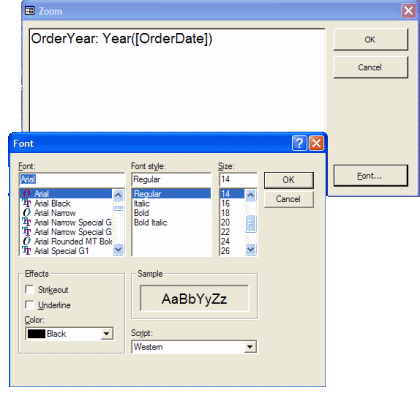
See all Topics access <Doug Klippert@ 3:36 AM
Comments:
Post a Comment
Wednesday, May 03, 2017 – Permalink – Font Properties PlusEverything you need to knowTo embed a font in a document or slide show so it can be displayed on any other machine, the font must support that action. The standard Windows properties statement does not show all the needed information. The bottom of this illustration shows the standard information shown when you right-click a font file, and choose properties. The two views at the top are what appear when the Microsoft Font properties extension is installed.  If you right click on a font file in Windows its basic properties are displayed. The Font properties extension adds several new property tabs to this properties dialog box. These include information relating to font origination and copyright, the type sizes to which hinting and smoothing are applied, and the code pages supported by extended character sets. It also will tell you if the font can be embedded and/or edited in a document.
Font properties extension, version 2.3 (32-bit only) See all Topics access Labels: Fonts, General, Properties, Tips, Tutorials <Doug Klippert@ 3:51 AM
Comments:
Post a Comment
Thursday, April 07, 2016 – Permalink – Plain NumbersI'd Like to Make It ClearPlain Figures is a method of transforming statistical and financial data into figures, tables and graphs that people readily understand. Have you ever:
PlainFigures.com See all Topics access <Doug Klippert@ 3:12 AM
Comments:
Post a Comment
Wednesday, February 10, 2016 – Permalink – Who was that font I saw you with last night?That was no font, that was my typefaceYou can find the Fonts supplied with some Microsoft products Select a product name from the list to get a list of fonts supplied with that product. Microsoft's Typography is an interesting site to poke around in. Here are some books I use for reference material: Words into Type by Marjorie E. Skillin, Robert Malcolm Gay ISBN 0139642625 Stop Stealing Sheep & Find Out How Type Works by Erik Spiekermann, E.M Ginger ISBN 0201703394 The Elements of Typographic Style by Robert Bringhurst ISBN 0881791326 "A font can be defined as a collection of characters with the same style and size. A typeface is the design of the characters regardless of size or style. The terms are used interchangeably today." See all Topics access <Doug Klippert@ 3:32 AM
Comments:
Post a Comment
|
